Disclosure: As an Amazon Associate, Varnilo earns from qualifying purchases at no extra cost to you. Our guides are built on deep manufacturer specification analysis, collector forum consensus, and verified owner reports.
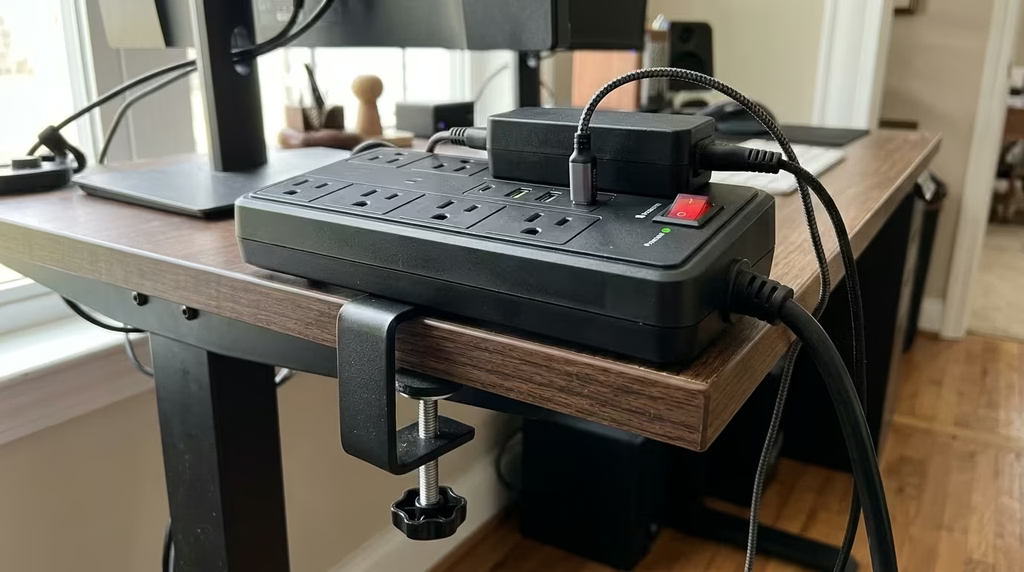
Crawl under your desk once to plug in a laptop charger, and you will immediately understand why edge-mounted power distribution has become essential for modern workspaces. Standard floor power strips create messy cable tangles, collect dust bunnies, and leave your primary devices vulnerable to line surges. Installing a dedicated clamp-on surge protector brings grounded alternating current (AC) outlets and high-speed USB-C Power Delivery (PD) right to desktop level, completely eliminating desktop wire clutter while keeping sensitive monitors, audio interfaces, and laptops safe from voltage spikes.
However, not all desk-clamping power hubs deliver on their promises. Many cheap models use flimsy plastic bracket thumbscrews that strip under load, skimpy metal oxide varistors (MOVs) rated under 500 Joules, or deceptive USB-C ports that trickle-charge at 15W instead of providing true laptop-grade 45W to 65W PD profiles. Pairing a high-spec power strip with a dedicated high-wattage GaN fast charging station can revolutionize workstation ergonomics, but having integrated surge suppression right at arm’s reach remains unmatched for everyday convenience. To uncover the truly durable options, we analyzed structural engineering blueprints, desk clearance tolerances, and real-world forum discussions across verified hardware communities.
SUPERDANNY 65W GaN Clamp-On Desk Surge Protector
Engineered with authentic Gallium Nitride (GaN) fast-charging architecture, this hub delivers true 65W USB-C Power Delivery capable of charging a MacBook Pro or Dell XPS directly from the desktop edge without a bulky power brick. Paired with a heavy-gauge steel C-clamp, 1,080-Joule MOV surge suppression, and 4 widely spaced AC sockets, it dominates hardware community recommendations for high-performance productivity desks.
| Model | Key Specs & Materials | Community Verdict | Amazon Listing |
|---|---|---|---|
| SUPERDANNY 65W GaN Desk Clamp | 65W GaN USB-C PD, 4 AC Outlets, 2 USB-A, 1080J Surge, Steel Clamp (fits up to 1.77″) | Top pick for laptop users wanting to ditch power bricks; pristine desktop footprint. | Check Price → |
| TROND Desk Clamp Power Strip | 30W USB-C PD, 6 AC Outlets, 2 USB-A, 1440J Surge, Fire-retardant PC Shell (fits up to 1.6″) | Beloved by audio engineers and multi-monitor power users for generous AC socket layout. | Check Price → |
| MOUNT-IT! Heavy Duty Desk Power Hub | 20W USB-C PD, 6 AC Outlets, 1200J Surge, Anodized Aluminum Housing, Fits up to 2.1″ | Industrial-grade build rigidity; thickest clamp clearance for heavy butcher-block desks. | Check Price → |
In-Depth Analysis: The 3 Best Clamp-On Desk Surge Protectors
1. SUPERDANNY 65W GaN Clamp-On Desk Surge Protector (The Power User’s Dream)
The biggest frustration with first-generation desk power strips was anemic USB performance. Most integrated ports supplied barely 10W to 15W, leaving laptop users still tethered to their bulky OEM charging bricks. The SUPERDANNY 65W GaN solves this flaw through integrated semiconductor engineering. By deploying Gallium Nitride circuitry, this unit sustains high-efficiency energy transfer without running hot against your desktop finish.
Constructed around a heavy-duty stamped steel bracket with silicone non-slip padding, the unit clamps down on desktop thicknesses between 0.4 inches and 1.77 inches. Its 4 AC outlets are oriented sideways with generous 1.6-inch center-to-center spacing, ensuring large transformer plugs do not obstruct adjoining receptacles. Technical community feedback on desk setup communities like r/Workspaces highlights that its single USB-C port negotiates full 20V/3.25A PD 3.0 handshakes seamlessly with modern laptops, reducing overall cable clutter to a single line.
- True 65W GaN Power Delivery charges ultrabooks and tablets without AC adapters.
- 1,080 Joules surge suppression with an automated thermal shutdown fuse.
- Dual USB-A QC 3.0 ports alongside USB-C for fast ancillary gadget top-offs.
- Maximum desk thickness cap of 1.77 inches limits compatibility with ultra-thick butcher-block tops.
- USB-C wattage drops from 65W to 45W if both USB-A ports are simultaneously utilized.
2. TROND Desk Clamp Power Strip with 30W USB-C PD (Maximum AC Capacity)
When your workstation demands dedicated power for dual monitors, studio monitors, a desktop DAC, and external hard drives, 4 AC outlets rarely suffice. The TROND Desk Clamp Surge Protector expands desktop capacity with 6 widely spaced, three-prong grounded AC outlets arranged along a rigid fire-retardant ABS enclosure. Unlike units that position outlets face-up to catch falling crumbs and dust, TROND utilizes an angled faceplate design that facilitates effortless one-handed plugging and unplugging.
Internal protection is spearheaded by a 1,440-Joule MOV network verified to clamp voltage spikes down to standard UL1449 safety thresholds. On the digital side, TROND provides a dedicated 30W USB-C PD port alongside two 2.4A smart USB-A ports. While 30W will not charge a workstation-tier laptop under full rendering load, verified buyers on consumer reliability forums like r/BuyItForLife note it fast-charges iPads, smartphones, and handheld consoles at peak charging curves with zero thermal throttling.
- Class-leading 1,440-Joule surge protection rating with illuminated grounded/protected LEDs.
- 6 AC outlets equipped with wide spacing to accommodate oversized power adapters.
- Heavy-duty 14AWG 9.8-foot power cord provides ample reach for motorized sit-stand desks.
- 30W max USB-C output cannot power large 15-inch or 16-inch laptops while in active use.
- Requires at least 2.5 inches of rear desk frame clearance behind the desktop bevel.

3. MOUNT-IT! Heavy Duty Desk Power Hub (Industrial-Grade Durability)
For custom woodworkers, industrial design studios, and commercial workstations featuring heavy 2-inch solid maple or butcher-block table tops, standard consumer clamps frequently fail to open wide enough. The MOUNT-IT! Heavy Duty Desk Power Hub bridges this gap with an extended steel clamping mechanism capable of gripping surfaces up to 2.1 inches thick. Its outer shell is constructed from extruded, brushed anodized aluminum rather than molded plastic, giving it superior structural stiffness when pulling stiff AC cords.
The unit features 6 surge-protected outlets rated at 1,200 Joules, alongside a 20W USB-C PD fast-charging socket and dual 12W USB-A outputs. The clamp assembly uses twin threaded mounting bolts with rubber-coated pressure footings, distributing mechanical torque evenly across the underside of the desk. This design prevents point-load denting on soft pine or veneered surfaces while maintaining rigidity when plugging in heavy three-prong grounded power supplies.
- Anodized aluminum alloy housing resists impact, heat, and physical wear over time.
- Broadest physical clamp aperture on the market, accommodating surfaces up to 2.1 inches thick.
- Dual-screw steel mounting bracket eliminates side-to-side wobble under lateral plug pull.
- USB-C port tops out at 20W, suitable for phone and peripheral charging rather than notebooks.
- Larger industrial footprint takes up slightly more horizontal edge real estate on compact desks.
How to Choose the Best Clamp-On Surge Protector for Your Workstation
Selecting the right desk edge power tap requires checking several dimensional and electrical parameters before buying. A mismatch in clamp clearance or joule ratings can turn a sleek cable-management upgrade into an unusable desktop paperweight.
1. Desk Edge Geometry and Under-Desk Clearance
Before purchasing, measure your desktop in three specific areas: desktop thickness, overhang depth, and under-desk rail clearance. Standing desks and steel-frame office tables often feature support crossbars running 1 to 2 inches inboard from the edge. If your desk frame lacks at least 2.5 inches of unobstructed flat surface under the overhang, a deep C-clamp bracket will collide with the frame. In such cases, look for shallow-profile brackets or slim thumb-screw tightening mechanisms.
2. True USB-C PD Wattage vs. Shared Bus Trickle
Marketing copy often touts “High Speed USB-C 3.1A”, which is merely basic 5V/3.1A (15.5W) shared charging. To fast-charge modern electronics, you need genuine USB Power Delivery (PD). Here is how power profiles align with real-world devices:
- 20W to 30W PD: Ideal for iPhones, Samsung Galaxy flagships, iPads, wireless charging pads, and wireless headphones.
- 45W to 65W PD: The minimum threshold to directly power and charge ultrabooks such as the MacBook Air, 13-inch MacBook Pro, ThinkPad X1 Carbon, and Dell XPS 13 without your original AC power brick.
3. Joule Rating and MOV Safety Architecture
Surge suppression is measured in Joules—the total cumulative energy the metal oxide varistors can absorb before degrading. For basic consumer electronics, 600 to 900 Joules is acceptable. However, for setups powering high-end workstations, studio monitors, or sensitive PC components, target 1,000 to 1,500 Joules minimum. Ensure the unit features an LED indicator confirming “Protected” status; MOVs degrade gradually with each surge event, and a status light ensures you know when the sacrificial components have expired.
A well-organized workstation combines smart edge power with total desktop wellness. While routing your power feeds and eliminating cable slack, you can complement your sitting posture with an ergonomic under-desk footrest to keep lower back fatigue at bay, and use a high-power cordless compressed air duster to keep edge sockets and mechanical switches clean from airborne grit.
Frequently Asked Questions
Will a clamp-on surge protector damage a standing desk or finished wood?
Reputable clamp-on power strips utilize non-marking silicone or high-density EVA rubber pads on both the upper lip and the lower pressure plate. These isolate clamping pressure and prevent indentations or scratches on lacquered solid wood, laminate, or glass. However, you should avoid over-torquing the tightening screw, particularly on hollow-core fiberboard desks (like certain IKEA honeycomb models) which lack the internal density to resist high localized clamping force.
Can I plug a clamp-on surge protector into a motorized standing desk?
Yes, and doing so is widely considered an ergonomic best practice. By securing the power strip directly to the moving desktop, all your monitor power leads, chargers, and lamp cords travel uniformly up and down with the desk. This means only one single heavy-duty cable needs to route down to the wall outlet via a cable spine, eliminating cord snagging and accidental disconnection when elevating to standing height.
What happens when the surge protector reaches its joule limit?
Quality surge protectors feature internal thermal fuses that disconnect the MOV circuitry once its cumulative energy absorption limit has been exhausted. When this happens, the “Surge Protected” indicator light turns off. On UL-certified models, AC pass-through power will either safely shut down or continue to operate as an unshielded power tap while signaling that the protective circuitry requires replacement.
Can the USB-C port replace my multi-monitor laptop dock?
No. The USB-C ports on clamp-on desk power hubs are designed exclusively for Power Delivery (DC power transmission) and fast battery charging. They do not contain DisplayPort Alt-Mode controllers or PCIe lanes for data transfer. You will still need your dedicated Thunderbolt or USB-C display hub for monitor outputs, but you can plug that hub’s high-wattage power supply directly into one of the clamp-on unit’s AC outlets.